
Pre-requisites
Connecting a Garmin requires an active Myzone Go subscription. Find details of how to connect your Garmin to Myzone and benefit from direct access to the Myzone ecosystem.
You must also have the Garmin Connect app installed on your phone, with an associated active Garmin Connect account. Your Garmin will need to be paired up with the Garmin Connect app.
To benefit from real-time MEPs and heart rate tracking on the MyTile screen, your Garmin must support Bluetooth Broadcasting.
Connecting your Garmin Watch
1. Select My devices from the menu in the Myzone App, then select Connect New Device.
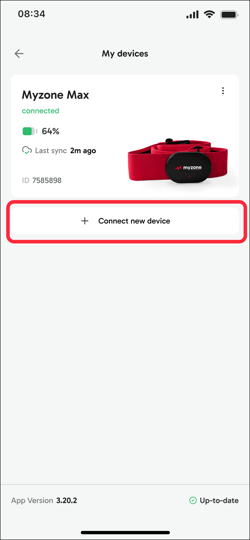
Note: You can have a Myzone device AND a smartwatch connected but not two different smartwatches.
2. Select Garmin from the Connect new device page.
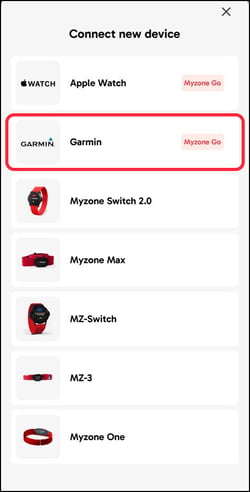
If you don't have an active Myzone Go subscription, at this point you will be prompted to sign up for a subscription or free trial. Information on how to sign up for Myzone Go can be found here.
Also at this point, if you already have a smartwatch paired with Myzone, you will need to remove it in order to connect your Garmin as you can only have ONE active connection to a smartwatch at a time.
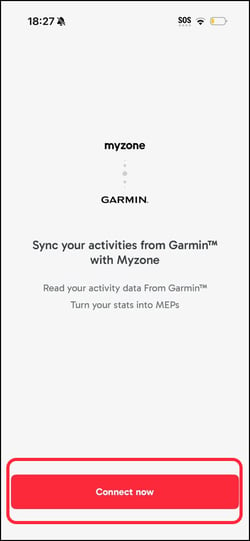
3. You will see a message asking you to Sync your activities from Garmin with Myzone. Select Connect Now.
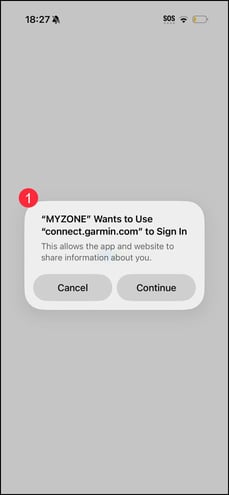
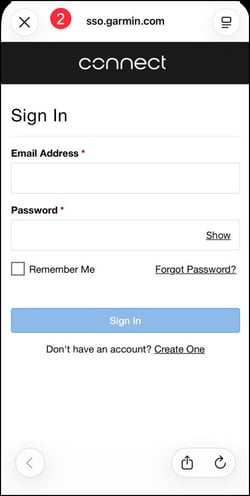
4. Follow the on-screen steps to set up the connection in the Garmin Connect app. Initially you will see a pop up message alerting you to the fact that Myzone wants to use connect.garmin.com to sign in. When you select Continue to this message, it will automatically direct you to the Garmin connect and ask you to log in.
5. Once connected, your Devices page in the Myzone app will show a Garmin integration tile, confirming that your account is linked.
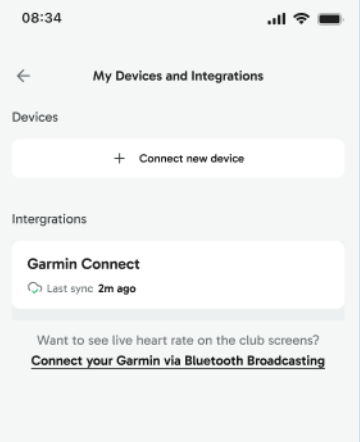
Note: At this stage, your Garmin watch itself won't appear as an active device yet - only the Garmin integration tile will show. Your watch will appear as an active connected device once your complete the optional Bluetooth step.
For information on how to enable Bluetooth Broadcasting, check out this article.