
The Health Connect integration is disabled by default but can be enabled in your phone settings. Follow these steps:
-
Open the Myzone App and go to your Settings (cog icon) in the top left corner of your Myzone home screen.
-
In Settings, scroll down to My Profile and select Health Connect. Turn on the toggle switch to enable it.
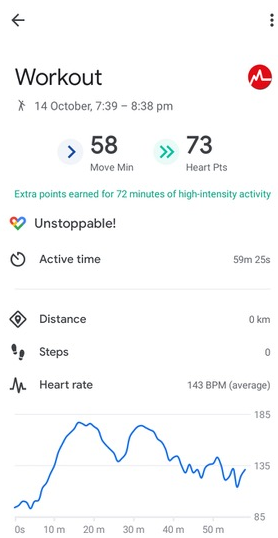
The Myzone app shares workout data, including heart rate, and converts MEPs to Health Connect's 'Heart Points' in accordance with WHO guidelines. Other data like steps, distance, elevation, and GPS mapping may appear alongside the workout if your phone or another app provides this information, as the Myzone app doesn't retrieve such data.
Here's how a workout tracked by the Myzone app might appear in Health Connect:
Additionally, your body metrics such as weight, height, body fat percentage, and basal metabolic rate are synced with Health Connect when the app is brought to the foreground and when you initially enable Health Connect in your settings. Please note that due to Health Connect's processing, there may be a delay of a few minutes up to half an hour or more before Myzone workout data appears in the Health Connect app.
For further inquiries about the above information, please contact Myzone Technical Support through the help button in your app.